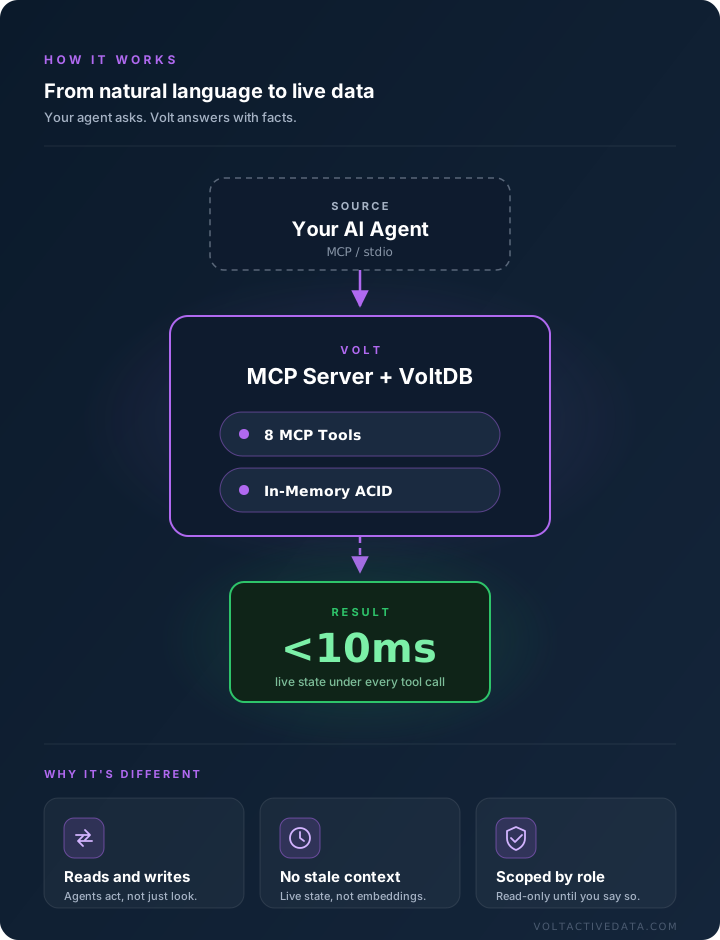
Connect Claude Code — or any MCP-capable agent — to Volt's native
MCP server. Your agent reads and writes real transactional state
through eight built-in tools, so it answers with facts instead of
guesses.
The Volt MCP server is a single JAR that any MCP client can launch over stdio.
Register it once and your agent can explore the schema, query live data, and
call stored procedures.
1
Get the pieces in place
Volt + VMC + the MCP JAR
2
Register with your agent
One command, once
3
Scope what it can touch
Dedicated role, read-only first
4
Ask your agent
It picks the right tool
terminal
Step 1: Get the pieces in place
You need a running Volt database with the Active(MCP) license feature,
its VMC service (the JSON/HTTP API) reachable from wherever your agent
runs, and the Volt MCP server JAR.
# You need three things:# 1. An MCP-capable AI agent, e.g. Claude Code# 2. A running Volt database with the Active(MCP) license# 3. Its VMC service (JSON/HTTP API), e.g. http://vmcserver:8080$ ls ~/voltmcp
volt-mcp-server.jar
Where do I get the JAR? The MCP server ships with Volt Enterprise — ask your Volt contact, or start here if you're new to Volt. Full details: Installing the VoltDB MCP Server.
Step 2: Register the server with your agent
One command adds Volt to your agent's list of MCP servers. Claude Code
is shown here; any MCP client that can launch a stdio server works the
same way.
Once is enough. The Volt tools are available in every later session. If your VMC service uses TLS, point --url at https:// and see the SSL configuration options.
Step 3: Scope what the agent can touch
Treat your agent like any other client: give it its own account and
start read-only. Create a role with SQL read permissions, keep the
credentials in a file, and pass them to the server.
$ sqlcmd
1>CREATE ROLE mcp WITH SQLREAD;
$ cat $HOME/voltcred.txt
username: mcpserverpassword: ********$ claude mcp add voltdb -- \
java -jar ~/voltmcp/volt-mcp-server.jar \
--url http://vmcserver:8080 \
--credentials=$HOME/voltcred.txt
Widen later. When you trust the agent's behavior, expand the mcp role's permissions — writes and procedure calls included. Details: Configuring the MCP Server.
Step 4: Ask. The agent does the rest.
No SQL in your prompt. The agent discovers your schema and picks the
right tool — get_tables to
look around, execute_sql to
answer, call_procedure to act.
> Which account had the highest spend in the last 5 minutes?
⏺ get_tables() → transactions, accounts⏺ get_table_schema("transactions")⏺ execute_sql("SELECT account_id, SUM(amount) …")
Account 42 — $18,304.77 across 214 transactions.
The MCP server exposes Volt to your agent as ready-made tools — schema
discovery, ad-hoc SQL, stored procedures, and cluster introspection.
execute_sql
Run any SQL statement against live data — DDL included.
get_tables
List the tables and views in the database.
get_table_schema
Column names and datatypes for any table.
get_procedures
Discover the stored procedures available to call.
call_procedure
Invoke a stored procedure with arguments — reads or writes.
get_system_information
Cluster version, node status, and deployment config.
get_statistics
Live metrics on the cluster and its components.
get_user_profile
What the connected account is allowed to do.
Why It Matters
Vector search alone vs. MCP + Volt
RAG pipelines retrieve what was true when you embedded it. Production
agents also need what's true right now — and the ability
to act on it.
Capability
RAG-Only (Vector DB)
MCP + Volt
Data freshness
As fresh as the last re-embed
Real-time — live queries against current state
Answer precision
Approximate — similarity match
Exact — ACID reads
Write capability
Read-only context
Full read + write — agents can act
Transactions
No guarantees
Serializable ACID
Fact grounding
Can serve stale context
Authoritative state at query time
State access
Vector search + rerank
<10ms SQL on the hot path
R+W
Agents that act, not just answer
RAG gives agents context. MCP + Volt lets them approve the order,
adjust the limit, update the record — transactionally.
0
Stale answers on facts
When the agent asks how many widgets are in stock, it gets the
number from the database — not a probabilistic guess.
<10ms
State behind every tool call
Volt's in-memory ACID engine sits under the MCP tools, so
grounding your agent doesn't cost you latency.
Vector search is the right tool for semantic recall over documents —
it just isn't a system of record. Use both: embeddings for unstructured
knowledge, Volt for live operational truth.
WHAT YOU CAN BUILD
AI agent use cases
Where agents need authoritative, real-time data — and the ability to act on it.
Ops & inventory agents
An agent that checks stock, reorders, and answers "how many, right now?"
with the real number — then writes the decision back with ACID guarantees.
LiveStock counts
ACIDWrite-backs
RAG grounded in live state
Keep embeddings for your documents; pull balances, quotas, and session
state from Volt at answer time. No re-embedding cycle, no stale context.
Real-timeContext freshness
0Stale answers
Autonomous decisioning
Agents that approve orders, adjust limits, or route tickets — every
action a serializable transaction your auditors can trace.
R+WFull CRUD
TraceableEvery action
What If Your AI Could Execute 1 Million Perfect Actions Every Second?
◷ 0:59Agentic AIVolt Active Data
WATCH & LEARN
AI that acts on what's true right now
Agents don't just need intelligence — they need an operational layer that's correct, consistent, and current at the moment they act. Volt is the authoritative state your agents query during reasoning, so decisions run on live business truth instead of a stale snapshot.
The Model Context Protocol makes that connection standard: one server, eight tools, and your agent can read state, execute transactions, and write back decisions with ACID guarantees — a million perfect actions every second.
Before your agent touches live data, teach it how Volt works. Agent Skills are free, MIT-licensed instruction sets that make coding agents fluent in Volt — partitioning, stored procedures, deployment, the lot.
voltdb-developmentvoltdb-kubernetesvoltsp
Drop a skill into your agent's skills directory and it writes Volt applications the way Volt engineers do — correctly partitioned schemas, single-partition procedures, tested clients.
# Install a skill (Claude Code shown)$ git clone https://github.com/VoltDB/volt-skills
$ cp -r volt-skills/voltdb-development ~/.claude/skills/
# Use it$ claude
> /voltdb-development
>Build me a spend-velocity check for this schema.